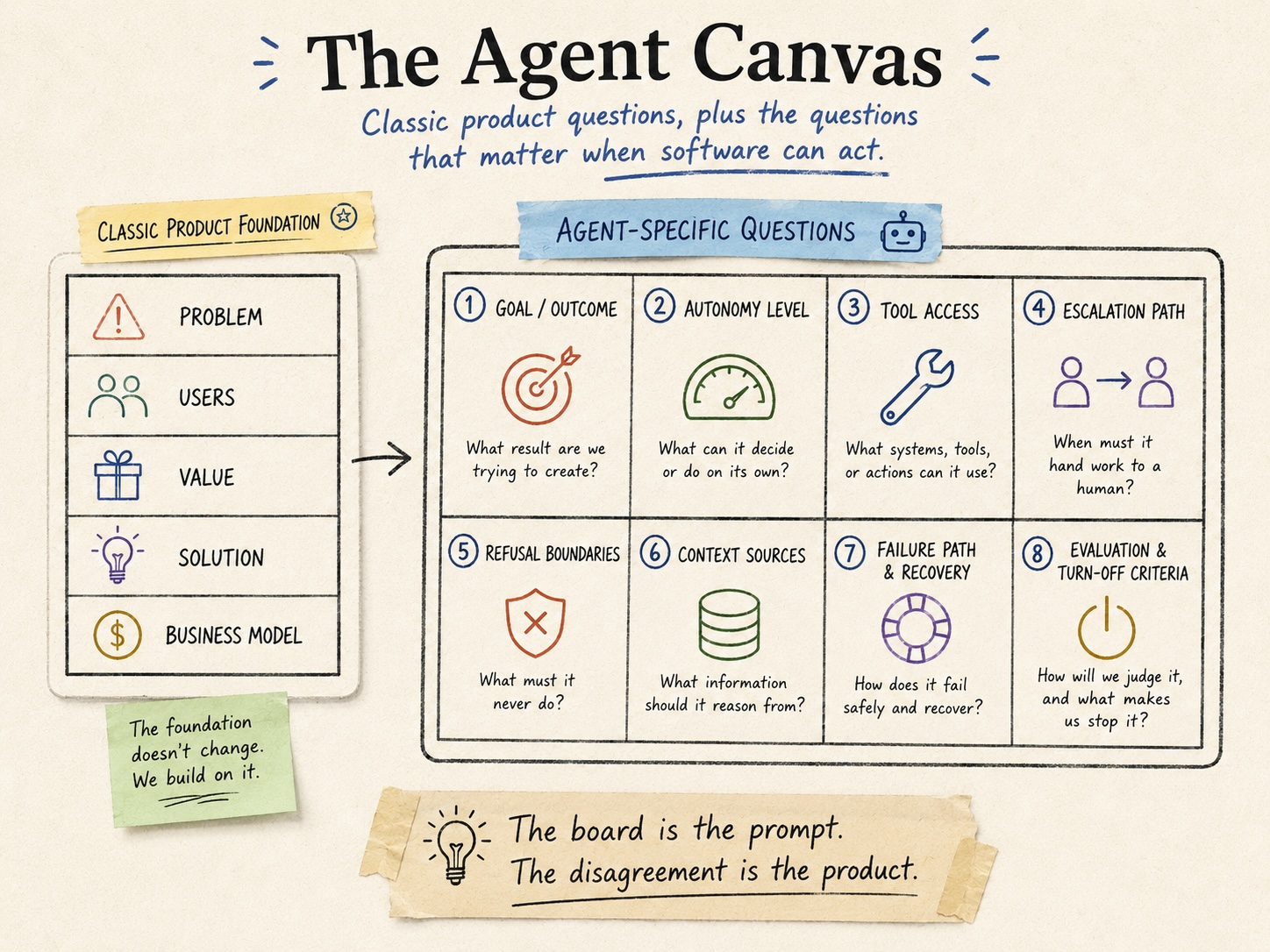
The last piece argued the pre-build conversation matters more for agents, not less. This one is about what’s actually on the page when you have it. The boxes, a worked example, and the three places teams fill it in wrong.
I made the case recently that the product canvas earns its place in agentic work, and that the value was never the artifact but the conversation it forces. A few people came back with a fair question. Fine, so what’s on the board? If the standard canvas doesn’t quite fit, what does the agent version actually look like when a team sits down to fill it in?
So this is the practical companion. Not the argument for caring, which I already made. The mechanics. What the boxes are, what a half-filled one looks like, and where I keep watching teams get it wrong.
A note before the boxes, because it’s the whole point. You are not filling this in alone at your desk and circulating it for comment. If one person completes the canvas, you’ve built a document and skipped the part that mattered. The canvas is an excuse to get four people who think they agree into a room and discover, on a whiteboard, that they don’t. Product, engineering, the domain expert who knows the edge cases, and whoever owns the risk if it goes wrong. The board is the prompt. The disagreement is the product.
What carries over, and what doesn’t
A standard product canvas already asks good questions, and you keep them. Who is this for. What problem are you solving. Why would they choose this over what they do now. How does value get created and what does it cost. None of that goes away because the software got smarter. If you can’t answer those, stop, and no amount of agent-specific tooling will save you.
What the standard canvas doesn’t surface is everything that follows from the software being able to act. A feature does what you built it to do. An agent receives a goal and decides how to pursue it, which means a whole set of questions that simply don’t come up for a dropdown menu or a report. Those questions are the agent-specific half of the board. Eight of them, in the order I’ve found they actually get argued.
These aren’t a replacement for the classic canvas. They’re the additions you bolt on once the software can act, the pressure points the old board never had to test. You still answer who it’s for and why it’s worth building. Then you answer these.
The eight boxes
The goal, stated as an outcome. Not “a support agent.” What does done look like, in a sentence a non-engineer would recognize? “Resolve a billing dispute end to end, or hand it to a human with the full context attached.” The looser this is, the more every box below drifts. Teams that skip straight to capabilities almost always have a vague goal underneath, and it shows up later as scope that won’t hold still.
Autonomy level. What does the agent recommend, what does it execute on its own, and what does it never do without a human saying yes? This is a graduated choice, not a switch, and it deserves its own article. On the canvas it gets one line per action class, and the rule of thumb is start lower than feels efficient. You can raise it once it’s earned.
Tool access. What can this thing actually touch? Every system, API, and database it can call. This box is where the room gets quiet, because the answer is usually “more than we realized.” An agent provisioned for one task tends to accumulate access, and the canvas is where you decide what it gets before someone wires in a credential under deadline.
Escalation path. When does it stop and ask? Name the triggers. Low confidence, a high-value action, an exception it wasn’t designed for, a tool that failed. An agent with no escalation path doesn’t fail safely. It presses on and improvises, which is the one thing you don’t want it doing on the case nobody anticipated.
Refusal boundaries. What does it decline to do regardless of how the request is phrased? This is different from escalation. Escalation is “I’ll check with a human.” Refusal is “no, not this, ever.” Spending above a threshold, touching certain records, taking an irreversible action in a category you’ve walled off. “Use good judgment” is not a boundary. A boundary is a sentence you could hand to an auditor.
Context sources. If tool access is what the agent can act through, context is what it can think from. What does it know, where does that come from, and how fresh does it need to be? And the box people forget: what is it not allowed to see? An agent grounded in stale or over-broad data fails in ways that look like bad reasoning but are really bad inputs. Name the sources and name the exclusions.
Failure path and recovery. When it gets something wrong, and it will, how do you find out, and how do you undo it? What’s logged, what’s reversible, who gets alerted. This is the box teams most want to defer to “we’ll monitor it,” and monitoring is not a recovery plan. If the answer to “how do we roll this back” is a shrug, you’re not ready.
Evaluation and turn-off criteria. How will you know it’s working once it’s running against real users and real data, not the demo? Three different things hide in this box and teams tend to name only the first. The operating metric: accuracy, escalation quality, how often it recovers, how long it takes. The business outcome it’s actually there to move, which is not the same as the operating metric and is the one that justifies its existence. And the turn-off threshold, the kill-switch, the number that would make you shut it down. Vague success criteria guarantee vague failure, and this box deserves its own treatment. On the canvas, at minimum, write down all three, and be honest that the turn-off line is the least mature part of most real deployments, which is exactly why it’s worth forcing onto the page now.
What it looks like half-filled
Before the example, the reminder that matters most. None of these eight boxes is magic. You could hand the list to two teams and get a safe agent from one and a disaster from the other, because the boxes don’t do the work. The argument does. The boxes exist to drag a disagreement into the open while it’s still cheap, which is on a whiteboard, not in production. Keep that in mind reading what follows, because the example below looks like a filled-in template and the real artifact was the twenty minutes of people not agreeing.
Take an internal agent that handles employee IT access requests, the kind of thing a team would stand up in a week now.
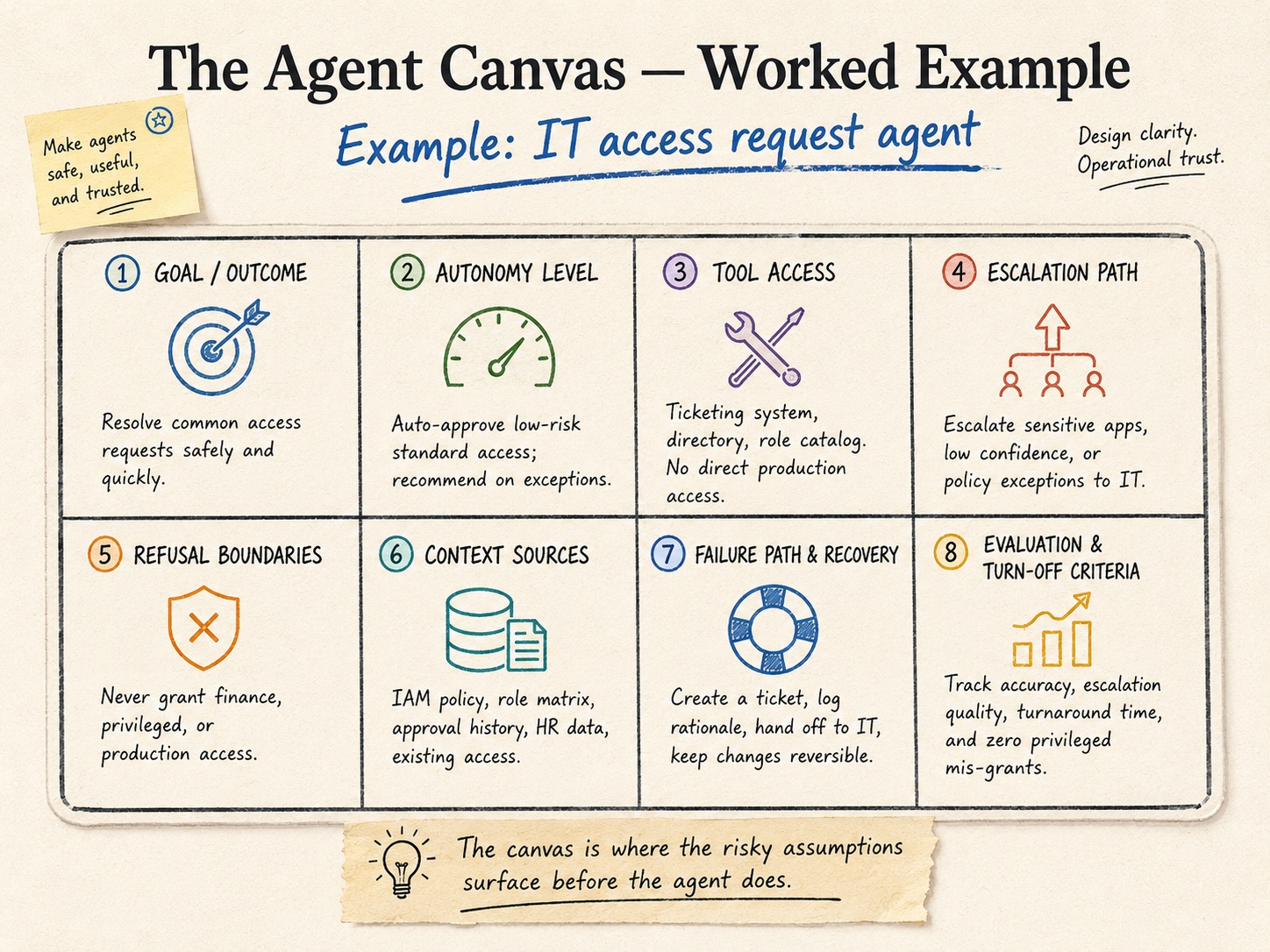
The goal box: resolve common access requests safely and quickly, and route anything non-standard to a human with a recommendation. Already that’s doing work, because someone in the room says “wait, does it grant, or does it only recommend?” and you’ve found your first real disagreement.
Autonomy: it auto-approves low-risk standard access and recommends on everything else, never acting on its own past that line. Tool access: the ticketing system, the directory, and the role catalog, with no direct production access. Escalation: anything touching a sensitive app, any low-confidence match, any policy exception goes to IT. Refusal: it never grants finance, privileged, or production access, full stop, no matter how the ticket is worded. Context: IAM policy, the role matrix, approval history, HR data, and existing access, and nothing beyond that. Failure path: it creates a ticket, logs the rationale, hands off to IT, and keeps every change reversible. Evaluation: track accuracy, escalation quality, and turnaround time as the operating metrics, faster access without a rise in bad grants as the business outcome, and one hard turn-off line, a single privileged mis-grant shuts it down.
Twenty minutes of that and you know whether you understand what you’re building. Most of the value showed up in the goal box, where you found out two people meant different things by “handle.”
The three places it goes wrong
Filling it in alone. The most common failure and the most fatal. A thorough canvas completed by one person is worth less than a messy one argued by four, because the entire point was surfacing the disagreement, and one person can’t disagree with themselves. If you circulate it for async comment instead of holding the room, you’ll get edits, not alignment.
Treating the boxes as a form. The boxes are prompts, not fields. The goal isn’t a complete board, it’s a real conversation, and a board with every box tidily filled and no argument behind it usually means nobody pushed. If filling it in was comfortable, you did it wrong.
Doing it once. Agents drift, models change, scope grows. A canvas that described the agent at launch and never got revisited describes a system that no longer exists. The conversation isn’t a gate you pass through. It’s one you come back to when the agent’s behavior or its boundaries change, which they will.
Internal or external, same board
I keep splitting examples between internal agents and external products on purpose, because the board doesn’t change between them and people assume it should. External products lean harder on the boxes customers feel: refusal boundaries, failure recovery, how the handoff to a human actually lands. Internal agents lean harder on tool access and governance, because the blast radius is your own systems. The emphasis shifts. The eight questions don’t. I’ve watched an internal automation fail for the exact reason an external product fails, which is that nobody held the room, because the work felt too small to warrant it.
That’s the fastest way to build the wrong agent, by the way. Not bad engineering. A skipped conversation. The build is the easy part now, which is precisely why the part that isn’t the build is where the wrong turns happen. The board takes an afternoon. Spend it before the agent can act, not after it already did.